Boardroom Plus - Barco
Boardroom Plus targets enterprise IT leaders, facilities heads, and C-suite buyers. Most visitors arrive mid-research, often on mobile, with limited time and high skepticism. The landing page needed to communicate value in minutes, not overwhelm users with technical depth, and still feel credible enough to justify proposal request.

Context
Problem
- What is the actual user problem here?
- What will executives scan in the first 10 seconds?
- What can we realistically ship in five days without it feeling rushed?
- studied Barco's design language so the page would feel familiar
- looked at major enterprise product pages for structural patterns
- built the first working prototype using Cursor + Gemini to accelerate layout and content integration
- A full prototype - with real structure and near-final content - was ready within a week, section by section.
Brand constraint
- pulled cues from their palette and typography rhythm
- kept the same enterprise restraint
- improved clarity without breaking brand familiarity
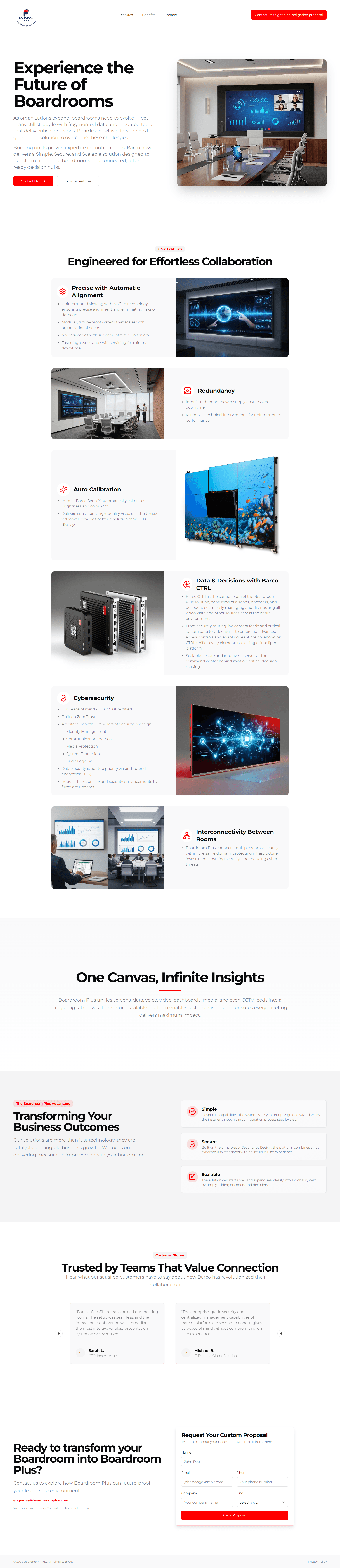
Hero
Tell an executive what this is, and give them an obvious next step.
So I kept the primary CTA as Contact Us, anchored directly to the form at the bottom.
No competing buttons. No unnecessary detours.
The product messaging was largely client-provided - we couldn't rewrite enterprise positioning from scratch.
But I worked closely with their content writer to tighten phrasing where clarity mattered, and stakeholders aligned on those tweaks.
Core Features
Boardroom Plus has depth. The risk was dumping complexity too early.
So I structured the feature section around scannability and outcomes, not technical naming.
The balance I aimed for:
• IT buyers still find substance
• Business buyers don't feel lost
That's what keeps enterprise pages readable.
Visual Support
Not all feature visuals existed when we started.
The client asked for help generating images using specific references.
To stay within the five-day window, I created those assets with AI - but with tight control:
• Structured prompts
• Multiple iterations
• Consistent enterprise tone
It wasn't decoration. It was about making abstract capabilities feel concrete without waiting weeks for a full asset pipeline.
Advantages
After feature depth, users need a breath.
The advantages section was intentionally minimal - a clean summary of what the system unlocks.
No long paragraphs. Just benefits executives care about.
Testimonials
In enterprise, features don't close trust gaps.
Social proof does.
Testimonials were placed to reinforce authority once the value was understood, as decision support for skeptical buyers.
Proposal Form: The most important interaction
This landing page existed for campaigns. The form was the business engine.
So form UX mattered more than anything:
• Only necessary fields
• Clear labels
• Nothing invasive too early
The rule was simple: Once someone decides to reach out, don't make them work for it.
Other Cases
View more works